
The Answer Cloud CMS separates your content from the layout that displays it. Authors update entries; a shared template gives those entries a consistent design. A developer or coding agent can maintain that template while the team maintains the words, images, and facts.
The parts of a collection#
A collection describes one kind of content, such as articles, FAQs, or resources. Its fields define what authors enter. An entry is one item in that collection, with its own title and public URL.
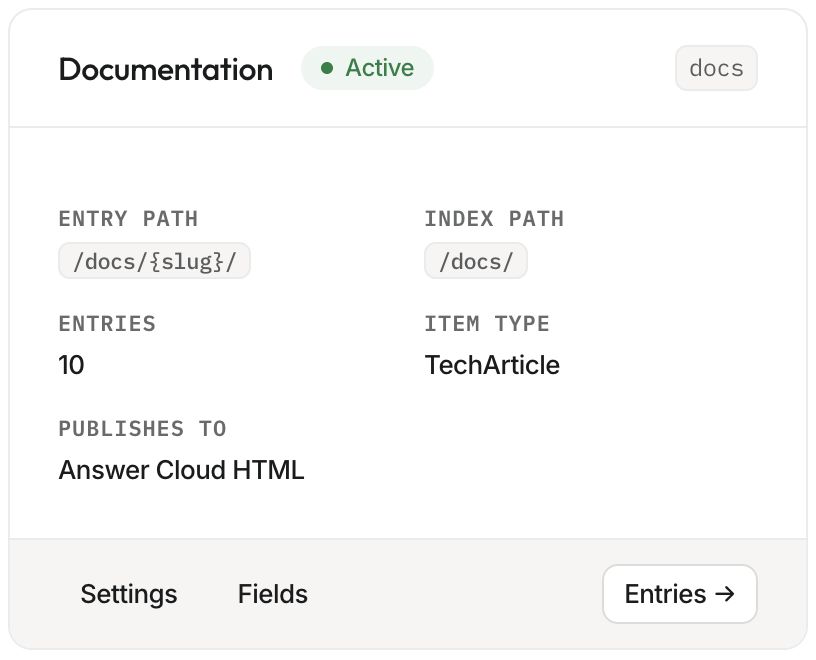
A collection has two layouts: a show template for an individual entry and an index template for its listing. Its entry path might be /resources/{slug}/, with an index at /resources/. The slug fills the placeholder, so installation becomes /resources/installation/.
| Part | Example | Managed in |
|---|---|---|
| Collection | Resources | CMS collection settings |
| Field | Summary | Field builder or collection schema |
| Entry | Installation guide | Entry editor |
| Template | Shared article layout | Deployed site source |
| Publishing destination | Answer Cloud HTML | Collection settings |
Drafts and published content#
Saving a draft keeps proposed changes separate from the public version. A published entry can have newer draft changes waiting for review. Preview the draft, then publish when it is ready. A preview does not update public files or make the draft discoverable.
For collections publishing to Answer Cloud HTML, publishing renders the entry and listing, updates generated discovery resources and Markdown mirrors, and makes the published content available to the site's retrieval pipeline. The site needs an existing live deploy for that rendering path.
A collection can instead publish to a connected Webflow CMS. That destination uses Webflow's publishing path and skips Answer Cloud HTML templates and indexes. Check the destination before reviewing prerequisites or deciding which public URL to verify.
Start with one useful collection#
Open your selected site's CMS screen. Review existing collections before creating another. Choose Entries to manage content, Fields to change the authoring form, or Settings to inspect paths and the publishing destination. Template health helps identify a missing layout.
Choose one small collection and publish one reviewed entry before scaling up. Confirm its public URL, listing, links, images, and chat retrieval. CMS capacity and feature availability depend on the site's plan; drafts can count toward the CMS allowance.
Continue with collections and fields, authoring entries, and previewing and publishing.